
 FrameOS
Color controls
Grade photos for the panel they will hang on - per photo, with the panel's own dither in the preview - and let the frame fit everything else into the panel's range by itself.
A six-color e-ink panel cannot show a photo's white. Its measured white is
closer to #b2c1c0 - a light grey - and everything brighter than that
quantises to solid white, the error diffusion clips, and the highlights go
flat. Shadows have the same problem at the other end. A photo that looks
right on a laptop screen looks washed out on Spectra 6, and the fix is the
same one a print shop uses: grade for the medium.
FrameOS does this in two layers. The frame fits every image into the panel's range on its own, so a plain slideshow already looks right. And each photo can carry its own color profile, edited next to the file with a preview that runs the panel's dither, for the ones you care about.
Where it applies
Every runtime: Raspberry Pi, ESP32 and the browser preview, on self-hosted and cloud-managed frames alike. The arithmetic is pinned to the same test vectors on the frame and in the editor, so what the preview shows is what the panel gets.
Per photo: Set colors
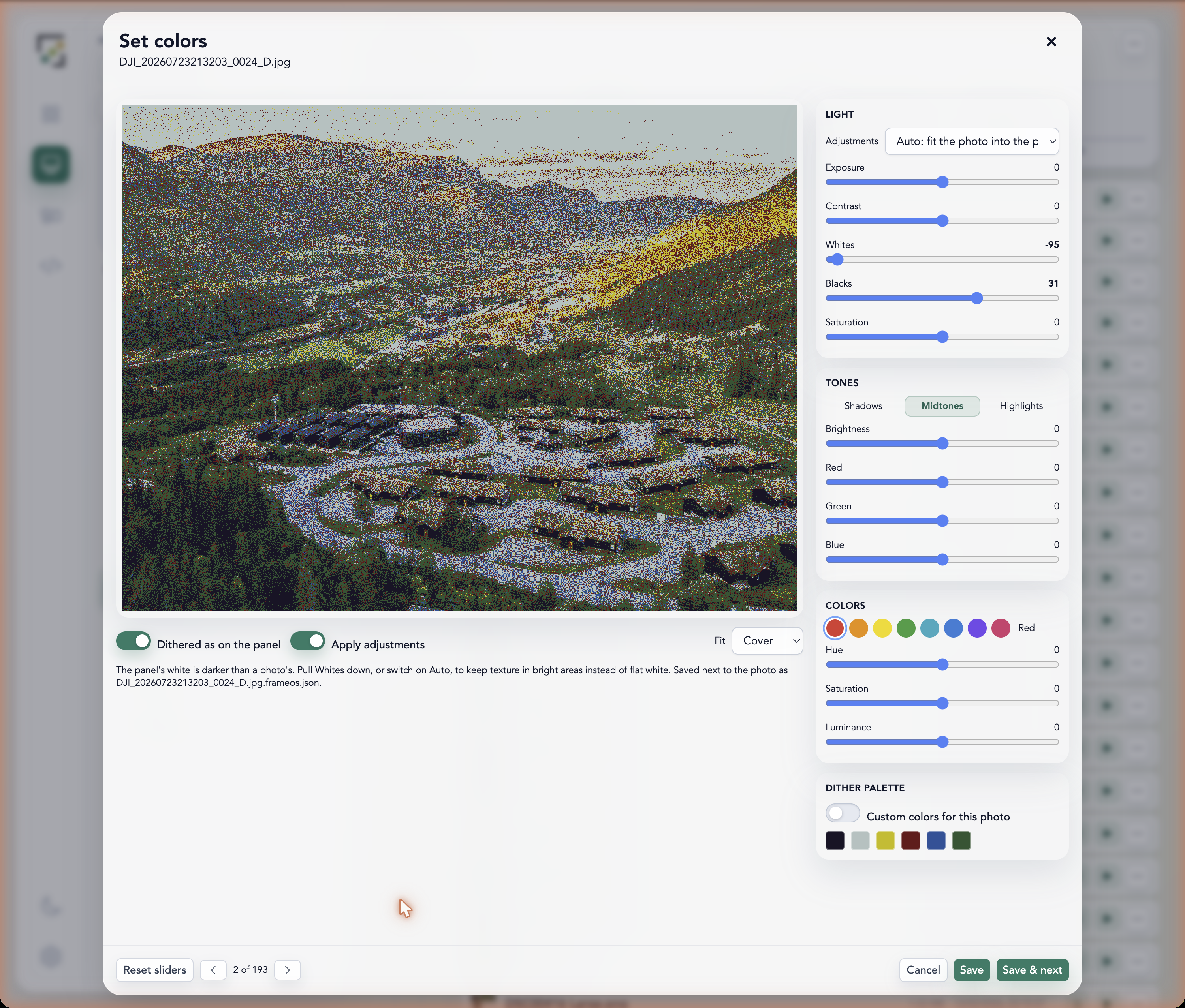
In the Assets panel every image row has a color button (the sliders icon; a swatch once the photo has its own profile). It opens an editor with the photo rendered at the panel's size, dithered to the panel's palette, next to the controls:
- Adjustments - None, Auto or Custom. Auto reads the photo's histogram and fills in Whites and Blacks so the photo lands inside the range the panel can show. Move any slider and it becomes Custom.
- Light - exposure (stops), contrast, whites, blacks, saturation.
- Tones - a luminance shift and an RGB tint for shadows, midtones and highlights.
- Hues - hue, saturation and luminance per range: red, orange, yellow, green, aqua, blue, purple, magenta.
- Dither palette - the colors the panel dither quantises against, for this photo only. Load a measured preset or type your own hex values.
Toggle Dithered as on the panel and Apply adjustments to compare, and pick the fit (Cover or Contain) the scene will use. Previous and next walk the folder; Save & next keeps your sliders and moves on.
The Photos library has the same editor (2026.10.13+): open a photo and the dials sit in a panel beside it, painted live, with the preview at full fidelity, as one of your frames shows it, or as a panel family would. A frame that plays an album gets each photo's profile with the photo, so the grading follows it to every frame.
Saving writes a small JSON file next to the photo - cat.jpg gets cat.jpg.frameos.json
- in the frame's assets folder. The file travels with the photo through every control plane (it is renamed and deleted with it, and hidden from the file tree), and any runtime applies it whenever it loads that photo. Every key is optional and neutral when missing; older firmware ignores keys it does not know.
{
  "version": 1,
  "colors": {
    "whites": -30,
    "blacks": 10,
    "saturation": 20,
    "hues": { "blue": { "saturation": 30 } },
    "palette": ["#191426", "#b2c1c0", "#c7bb00", "#6b1119", "#18539a", "#2a5531"]
  }
}
Per frame: the automatic fit and a global correction
The frame's Colors settings section carries two things that apply to everything it draws, not just photos with a sidecar:
- Auto color correction - Default, Always on or Off. Default is on for the color-ink panels - Spectra 6, 7-color ACeP and the four-color black/white/red/yellow ones - and off on full-color, grayscale and black-and-white displays, whose black and white are already a photo's own. Every image an app draws - a local file, a URL, Immich, an AI-generated picture, a JS app's own fetch - has its luminance range mapped onto the palette's range right after it is drawn. A photo with its own profile is left alone: explicit sliders win.
- Fine tuning - the same slider set as the editor, applied once to the whole finished canvas, after the fit. The place for "this panel runs a little green".
Both run as 256-entry lookup tables, three lookups per pixel, which is what makes them affordable on every render of a 13.3" panel on an ESP32. Nothing is resized, proxied or pre-processed off the frame.
Per frame: the dither palette
Panels that dither to a palette - the Spectra 6 family - take a Palette setting: the six colors the dither quantises against, as measured on the panel rather than as the datasheet draws them. The Pi driver reads it at start-up; an ESP32 picks it up on the next render (firmware 2026.10.4 or newer). A photo's own palette, from the editor above, still wins for that photo.
Big images on small devices
How FrameOS renders a 12-megapixel photo on a device with 8 MB of RAM - streaming decoders, bounded decodes, spooling and caching.
Controlling the frame
Every frame serves its own web app and HTTP API on port 8787. Whether it's standalone, self-hosted or cloud-managed - control it from anything that speaks HTTP.